Check Your KYC Status
Find your current status and follow the next step.
KYC status shown on wallet page
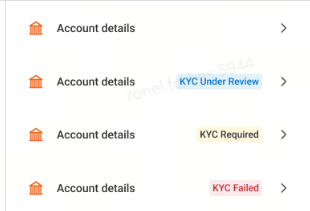
Kung walang nakasulat sa tabi ng Account Details, ibig sabihin ay updated at verified pa ang KYC ng iyong Lalamove Account.
-2.png?width=1200&length=1200&name=image%20(11)-2.png)
.png?width=1200&length=1200&name=image%20(12).png)
-2.png?width=1200&length=1200&name=image%20(13)-2.png)
.png?width=1200&length=1200&name=image%20(14).png)
.png?width=1200&length=1200&name=image%20(15).png)
.png?width=1200&length=1200&name=image%20(16).png)
.png?width=1200&length=1200&name=image%20(17).png)
Ano ang Gagawin Kung Na-reject ang Iyong KYC?
Kung na-reject ang iyong KYC submission, huwag mag-alala. Makakatanggap ka ng notification sa app para ma-update ang iyong impormasyon at maipasa itong muli. Sundin ang mga hakbang sa ibaba para makumpleto ang iyong verification.
-2.png)
1. Tab "Account Details"
.png)
2. Option to resubmit or change another bank
.png)
3. Resubmit KYC form
.png)
4. Change to another cashout account
.png)
5. Re-fill information required
.png)
6. Confirm and submit
.png)
7. KYC form submitted for internal review
For Existing Drivers Without an Approved GCash KYC
GCash, No KYC Record
Tab "Cashout"
-2.png?width=150&height=323&name=image%20(11)-2.png)
Views data Collection Declaration
.png?width=145&height=323&name=image%20(12).png)
Uploads GCash profile screenshot
.png?width=150&height=333&name=image%20(25).png)
Fills in KYC Information
.png?width=150&height=333&name=image%20(14).png)
Complete all mandatory fields
.png?width=150&height=333&name=image%20(15).png)
Confirm and Submit
.png?width=150&height=333&name=image%20(16).png)
KYC form submitted for internal review
.png?width=150&height=333&name=image%20(17).png)
Need Help?
If you're having trouble completing your GCash KYC or checking your verification status, contact Driver Support for assistance.